


LastSeen Chat Tracker
4.124.00 Reviews
App Specs
- Version
- 1.1.0
- Updated On
- License
- Free
- Downloads
- 10,000+
- Developer
- Droid Software SRL
- Categories
- Parenting
- Platform
- Android
Screenshots
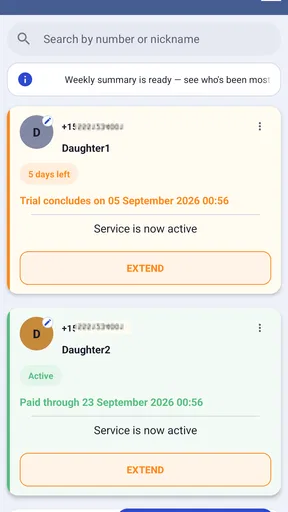
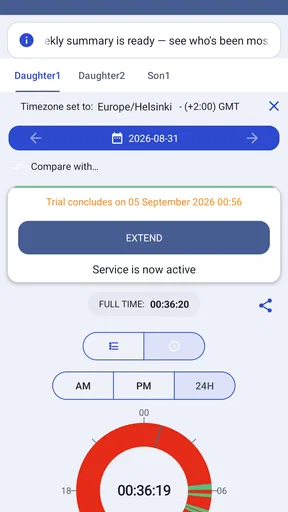
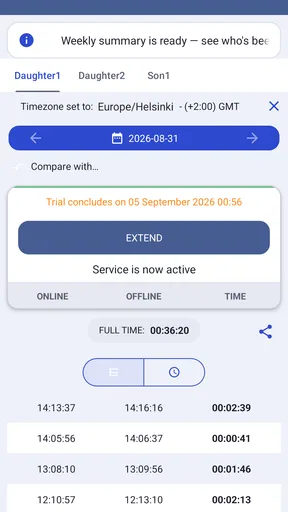
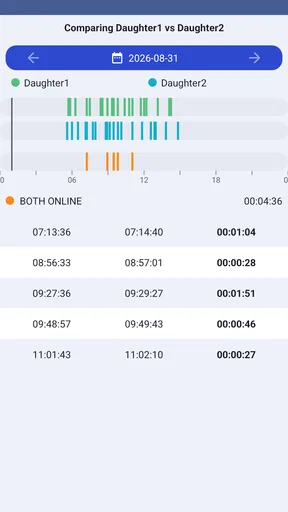
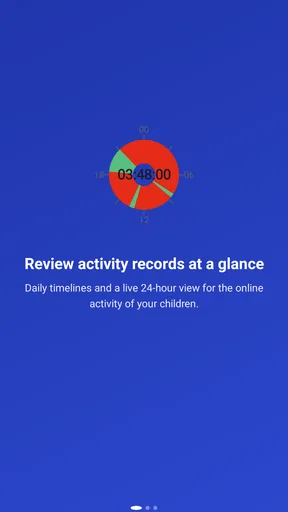
 Analysis by AppCompare
When I judge an app that follows other people’s online activity, I start with a question more important than convenience: does using it fit the kind of relationship I want to have with those people? LastSeen Chat Tracker is a parenting app from Droid Software SRL, built around watching WhatsApp availability rather than managing family schedules or setting limits on a child’s device. That narrow focus can be useful, but it also makes consent and expectations central to the decision.
I would treat it as a possible conversation aid, not as a substitute for talking with a child. Seeing an activity pattern cannot explain why someone was online, whether they saw a message, or what they were doing. Before adding a number, I’d explain what I intended to monitor and why, then agree on boundaries that make sense for the child’s age. Quietly tracking a teenager’s status may undermine trust even if the technical information is visible elsewhere.
What the activity view can—and cannot—tell you
A last-seen or online indicator is a small piece of context, not a reliable account of someone’s day. A brief appearance may mean only that the person opened the messaging app; it does not show who they spoke with, what they read, or whether they are available to respond. I would avoid using a status change as proof of a missed message or a reason to confront someone.
That distinction matters especially for parents. If I were worried because a child had not replied, an activity alert might provide a clue to start a calm check-in, but it would not establish that the child had read my message or deliberately ignored it. For urgent safety concerns, a status-monitoring tool is the wrong channel; I would call, contact another trusted adult, or use an agreed family safety plan instead.
Choosing a sensible tracking routine
Rather than enabling every alert and watching throughout the day, I’d begin with one clearly explained use case. For example, a parent and older child might agree that checking a broad availability pattern helps coordinate a pickup. The parent can then decide whether a notification is genuinely useful or whether a direct message and a mutually agreed reply window would be less intrusive.
A practical tip is to set a specific time to review the information instead of reacting to each change as it happens. That reduces the temptation to read meaning into every online moment and makes it easier to stop when the original need has passed. If the app’s available controls do not let you create that kind of boundary, I’d keep use limited rather than turning monitoring into a constant habit.
I’d also be careful about entering someone else’s phone number. A number is personal information, and adding it to a tracking service is a choice worth discussing first. If a child is old enough to understand the arrangement, I’d explain what is being watched, who will see the alerts, and when tracking will end. For a younger child, I’d still make the purpose clear in age-appropriate language rather than presenting surveillance as a game.
Worth Reading Before You Choose

Flipboard Shows What News Apps Must Do Beyond the Feed

Switching to Android Auto Means Rethinking Your Driving Routine

Google Calendar Makes a Crowded Week Easier to Manage

Ludo King Makes the Most of the Minutes Between Plans

Baby Panda World Brings Quick Play to Modern Phones, but Its Game Library Feels Busy

ESPN’s Live Game View Makes Following Close Games Easier
Getting Started with LastSeen Chat Tracker
First things first, downloading and setting up LastSeen Chat Tracker is a breeze. Available on both Android and iOS, it’s just a quick search away on your respective app store. Once installed, it prompts you to allow certain permissions — pretty standard stuff for tracking apps. Don’t worry, it’s all about giving you the best experience.
The interface? Clean and straightforward. You’re greeted with a dashboard that’s easy to navigate, even if you’re not a tech wizard. It’s like the app just knows we don’t have time to mess around with complicated setups.
How Does It Work?
So, what does this app actually do? In layman’s terms, it tracks the online status of your WhatsApp contacts. You can see who’s online, when they were last seen, and even get notifications if a particular contact comes online. It’s like a superpower for the curious (or maybe suspicious) mind!
Setting up a contact to track is simple. Just add them by their phone number, and you’re good to go. The app starts monitoring their activity, giving you updates in real-time. It feels a bit like magic, seeing the data roll in.
The Not-So-Secret Sauce
Now, you might be wondering about privacy concerns. Rest assured, LastSeen Chat Tracker doesn’t actually hack into WhatsApp or do anything shady. It uses publicly available data — like the online/offline status that anyone can see — and consolidates it for you. It’s not breaking any rules, just doing some clever data compiling.
One feature I absolutely love is the customizable notifications. You can set the app to ping you whenever someone comes online or goes offline. It’s perfect for those times when you’re waiting for a reply but don’t want to keep checking your phone obsessively.
Making notifications useful rather than noisy
Alerts can help when timing matters, but they can also create a new reason to check your phone. I’d start with notifications for only the contact and event that serve a specific purpose, then see whether they actually reduce repeated manual checking. If an alert simply makes me wonder what every status change means, I’d turn it off or use the app less often.
There is a useful trade-off here: frequent updates may feel reassuring, while fewer alerts make it easier to keep the information in perspective. A parent coordinating a known routine may prefer a limited check-in window; someone hoping to infer mood or intent from status changes is likely to be disappointed. No notification can tell you why a person came online.
Trust, settings, and careful choices
When an app requests permissions, I don’t accept them on autopilot. I read each prompt, consider whether it makes sense for the action I want to take, and avoid granting access that seems unrelated. The exact permission choices and account controls matter because they determine what I am authorizing on my own device. If I cannot understand a prompt or the reason for it, I pause rather than assuming it is harmless.
I also look for clear choices about stopping use: whether I can remove a tracked contact, switch alerts off, or delete the app without leaving a tracking routine running. I would check the controls shown in the app itself and the device’s settings, rather than assume that uninstalling automatically answers every account or data question. For a family, agreeing on a review date is a simple way to prevent a temporary safety arrangement from becoming indefinite.
These are not just technical niceties. A parent should know what they are asking a child to accept, and a child should have a way to raise concerns. If the goal is punctuality, an agreed message or location-sharing arrangement may be more transparent. If the goal is general digital wellbeing, a family conversation about screen habits is usually more informative than a log of online moments.
What’s the Catch?
Okay, let’s talk about the elephant in the room: battery life. Tracking apps can be a bit heavy on your phone’s resources, and this one is no exception. You might notice your battery draining a little faster than usual, so it’s something to keep an eye on.
Another thing to note is that while the app is free to download, some features are locked behind a paywall. You’ll need to subscribe to unlock multiple contact tracking or extended history logs. It’s a tad annoying, but hey, developers gotta eat too, right?
Costs, alternatives, and fit
The app is free to install, though in-app purchases range from $2.49 to $34.99 per item. I would check what an item unlocks and whether it is a recurring charge before paying; the price alone does not tell me whether a feature will solve my particular problem. If I only need an occasional check, I’d try the free experience first and avoid buying extra tracking capacity simply because it is offered.
Compared with ordinary parenting tools, this is a more focused and more intrusive option. Screen-time controls are better when the concern is how long a child uses a device, while family calendars and direct messages work better for coordination. Last-seen monitoring may suit a narrow situation where availability itself is relevant, but it cannot replace those broader tools or explain a child’s behavior.
A realistic example is a parent waiting for a teenager to confirm they have left an after-school activity. A status change could prompt the parent to send a check-in, but it should not be treated as confirmation that the teenager is on the way. If reliable arrival information is essential, a direct reply or another mutually agreed safety method is more dependable. That is the key limitation: the app can organize visible status changes, but it cannot turn them into certainty.
For a quick sense of scale, it has a 4.1 average from around 7,000 ratings and more than 10,000 installs. It is free to download, rated for Everyone, and its current version is 1.1.0, with Android 5.0 as the minimum requirement. Those details may help with basic compatibility and expectations, but they do not answer the personal question of whether this style of monitoring belongs in your family routine.
Is It Worth It?
So, is LastSeen Chat Tracker worth downloading? If you’re someone who likes to keep tabs on your friends or is just a bit curious about online patterns, it’s definitely worth a shot. It’s user-friendly, works as advertised, and gives you a peek into the online habits of your contacts.
However, if you’re worried about battery usage or not keen on paying for extra features, you might want to weigh your options. But for the sheer convenience and fun factor, I’d say give it a try!
In conclusion, LastSeen Chat Tracker makes it easier to satisfy your curiosity (or paranoia) without too much hassle. Just remember to use it responsibly and respect others’ privacy. After all, with great power comes great responsibility!
My cautious verdict
I’d consider this app only for a specific, openly discussed need—not as a way to keep constant tabs on a child or to interpret a person’s intentions. Its straightforward focus and alerts may appeal to someone who wants a compact view of online availability, while the monitoring itself, possible battery impact, and paid extras call for restraint.
If your priority is trust, communication, or managing screen use, I’d choose a direct family agreement or a tool designed for that purpose instead. If you do try this tracker, start small, review permissions and purchase choices carefully, and agree on when tracking should stop. That makes the app easier to assess without confusing a status signal with the person behind it.
Pros
- Easy to navigate interface.
- Real-time updates on chat activity.
- Customizable notifications.
- Secure login with privacy options.
- Supports multiple chat platforms.
Cons
- Limited free features available.
- Requires constant internet connection.
- Battery usage can be high.
- Occasional syncing delays.
- Premium version is pricey.
FAQs for LastSeen Chat Tracker
What is LastSeen Chat Tracker and how does it work?
LastSeen Chat Tracker is an app designed to help users monitor the online status of their contacts on messaging platforms. The app provides real-time updates and notifications when a contact comes online or goes offline. It works by tracking the activity patterns of the selected contacts, offering insights into their online habits.
Is LastSeen Chat Tracker safe and secure to use?
Yes, LastSeen Chat Tracker emphasizes user privacy and security. The app does not require access to personal messages or store user data on its servers. It operates by tracking public data available from messaging platforms, ensuring that no private information is compromised.
Does LastSeen Chat Tracker support all messaging platforms?
The app is primarily designed for popular messaging platforms such as WhatsApp and Telegram. However, support can vary based on updates and platform restrictions. It’s recommended to check the app's description or website for the latest information on supported platforms before downloading.
Are there any subscription fees or in-app purchases in LastSeen Chat Tracker?
LastSeen Chat Tracker offers both free and premium versions. While the free version provides basic tracking features, the premium version unlocks additional functionalities such as multiple contact tracking and detailed analytics. Subscription fees apply for the premium features, and details can be found within the app.
Can LastSeen Chat Tracker run in the background without draining battery life?
Yes, the app is optimized to run efficiently in the background, ensuring minimal battery consumption. It uses advanced algorithms to track activity without significantly impacting device performance. Users can manage settings to balance tracking accuracy and battery usage according to their preferences.


